SQLite: when Insert means Delete
Modernizing some of SoundCloud's Android app storage layers, I've been especially invested in databases, and have been migrating a lot of the core entities of the app between our in-house ORM and industry-known alternatives, as Room and SQLDelight.
There are many parts to that work, ranging from understanding the current standings of the schemas to coming up with improvements, risk mitigation or reducing overall tech-debt. It has been a great opportunity to learn about the internals of SQLite, the RDBMS that powers most mobile apps, widely popular in Android but that also backs iOS' CoreData framework.
Today, I want to describe an interesting scenario we've hit while using a few more advanced features of SQLite: Foreign Key trigger actions, but more deeply, how their usage in combination to insertion statements can raise unexpected effects.
Foreign Key Actions
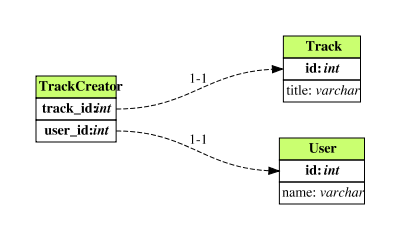
Let's imagine a schema with two tables, User and Track and a junction table TrackCreator whose schema is as follows:
CREATE TABLE IF NOT EXISTS TrackCreator (
  `track_id` TEXT NOT NULL,
  `user_id` TEXT NOT NULL,

  PRIMARY KEY(`track_id`, `user_id`),

  FOREIGN KEY(`track_id`) REFERENCES `Track`(`id`) ON UPDATE NO ACTION ON DELETE CASCADE,
  FOREIGN KEY(`user_id`) REFERENCES `User`(`id`) ON UPDATE NO ACTION ON DELETE CASCADE
)
Having a junction table is great because it allows us to write queries that JOIN the columns of either of the referenced tables, for example, if we need to get the creator name for a given Track.
Now, if either the Track or the User that created it gets deleted or have its id altered, SQLite can automatically update our TrackCreator table if we set a Foreign Key action for these references.
SQLite's documentation does a great job explaining what foreign keys are, and more interestingly the possible actions one can register as triggers to an update or delete in the parent table.
Conflict resolution
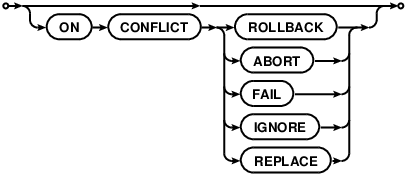
SQLite also accounts for possible conflict resolutions when constraints are violated: on the example above, stating an INSERT for an already existing Track or User would violate the PRIMARY KEY uniqueness constraint on either table.
Most ORMs make it really easy to define a conflict resolution, altering the INSERT statement to include the ON CONFLICT clause:
When working with Room, that can be done on the Dao by specifying it in an annotation:
@Dao
interface TrackDao {
    @Insert(onConflict = OnConflictStrategy.REPLACE)
    fun insert(tracks: List<TrackEntity>)
}
The catch
Now, on the setup above, a surprising effect would happen when inserting an already existing Track or User. As SQLite's documentation states:
When a UNIQUE or PRIMARY KEY constraint violation occurs, the REPLACE algorithm deletes (…) prior to inserting or updating the current row.
So here we are:

And at that point, our ON DELETE action will trigger, effectively removing the entry from the junction table as well. That means queries that rely on the JOIN statement will yield no results.
Android specificities
During our investigation, we were made aware of this behaviour by reading SQLite log statements. On Android, the mechanism to enable logging isn't straightforward, but exists.
When inserting Tracks that violate the uniqueness constraint of the primary key, we confirm our hypothesis:
V/SQLiteStatements: /data/com.soundcloud/databases/sc.db: "BEGIN EXCLUSIVE;"
V/SQLiteStatements: /data/com.soundcloud/databases/sc.db: "INSERT OR REPLACE INTO `Users` (...) VALUES (...)"
V/SQLiteStatements: /data/com.soundcloud/databases/sc.db: "INSERT OR REPLACE INTO `Users` (...) VALUES (...)"
V/SQLiteStatements: /data/com.soundcloud/databases/sc.db: "-- TRIGGER room_table_modification_trigger_trackuser_DELETE"
V/SQLiteStatements: /data/com.soundcloud/databases/sc.db: "-- UPDATE room_table_modification_log SET invalidated = 1 WHERE table_id = 7 AND invalidated = 0"
V/SQLiteStatements: /data/com.soundcloud/databases/sc.db: "-- TRIGGER room_table_modification_trigger_trackuser_DELETE"
V/SQLiteStatements: /data/com.soundcloud/databases/sc.db: "-- UPDATE room_table_modification_log SET invalidated = 1 WHERE table_id = 7 AND invalidated = 0"
V/SQLiteStatements: /data/com.soundcloud/databases/sc.db: "-- TRIGGER room_table_modification_trigger_users_DELETE"
V/SQLiteStatements: /data/com.soundcloud/databases/sc.db: "-- UPDATE room_table_modification_log SET invalidated = 1 WHERE table_id = 0 AND invalidated = 0"
V/SQLiteStatements: /data/com.soundcloud/databases/sc.db: "-- TRIGGER room_table_modification_trigger_users_INSERT"
V/SQLiteStatements: /data/com.soundcloud/databases/sc.db: "-- UPDATE room_table_modification_log SET invalidated = 1 WHERE table_id = 0 AND invalidated = 0"
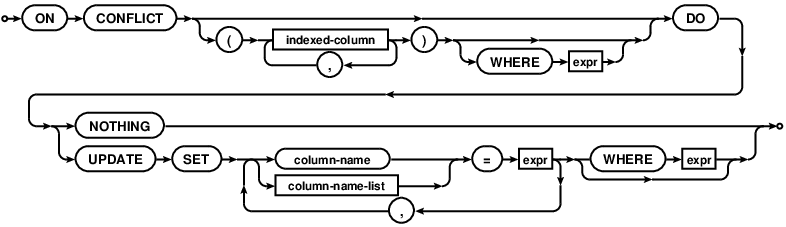
Starting on version 3.24.0 (2018–06–04), SQLite does provide an UPSERT statement (following the syntax established by PostgreSQL) but the bundled version of SQLite in the Android framework is not quite up-to-date.
It is still possible to 'manually implement' UPSERT by mimicking SQLite's syntax:
Time for a migration
In our case, we could relax our constraint definition by dropping the ON DELETE action trigger, instead of implementing the UPSERT. Here, the usage of SQLite brings a bit more work: the ALTER TABLE statements omit many of the advanced clauses other SQL engines provide, including CONSTRAINT manipulation related.
So, in order to change the constraint definition for the foreign key, we require a multi-step migration, that will copy the existing data into a temporary table and rename it afterwards:
database.execSQL("""
    CREATE TABLE IF NOT EXISTS TrackCreator_temp (
        `track_id` TEXT NOT NULL,
        `user_id` TEXT NOT NULL,
        PRIMARY KEY(`track_id`, `user_id`),
        FOREIGN KEY(`track_id`) REFERENCES `Track`(`id`) ON UPDATE NO ACTION ON DELETE NO ACTION ,
        FOREIGN KEY(`user_id`) REFERENCES `User`(`id`) ON UPDATE NO ACTION ON DELETE NO ACTION
        )
    """.trimIndent())

// Move all data to temporary table
database.execSQL("INSERT INTO TrackCreator_temp SELECT * FROM TrackCreator")

// Drop mis-scheme table
database.execSQL("DROP TABLE TrackCreator")

// Rename temporary table to definitive name
database.execSQL("ALTER TABLE TrackCreator_temp RENAME TO TrackCreator")

// Recreate indexes if needed (omitted for brevity)
Conclusion
One must be attentive to the underlying mechanisms of third-party tooling. Dealing with persistence and databases, it pays off to get acquainted to some degree of detail, especially given the cost of a post-factum change.
Being embedded, and in an almost feature-freeze on mobile OSs, SQLite's lean API still provides 'eureka moments'. There are always opportunities for learning.